

We value your partnership and the insights you bring. As we prepare for Back to School (BTS) 2025, we’re committed to a more collaborative and proactive approach.
Please share your BTS 2025 requirements using the form below. Your input will help us plan early and support your goals effectively.
If you have any questions related to BTS 2025, please feel free to send an email to support@magicedtech.com. Our dedicated support team will be more than happy to assist you.
MagicBox Secure Rostering
MagicBox currently supports the majority of industry standards for seamlessly rostering data from multiple platforms, ensuring trouble-free data migration and onboarding processes.
To request a demo for your preferred rostering integration from the options below, please send a request.
MagicBox Secure Single Sign On (SSO)
To enhance user experience and simplify access for schools and districts, MagicBox offers multiple Single Sign-On (SSO)
integration options. Whether through ClassLink, SAML-based SSO, or LTI 1.0/LTI Advantage.
Feature Upgrades
1. Printable Assessment
The Native Word Document Assessment Builder allows teachers to create fully editable, print-ready
Word assessments with accurate formatting for math equations, graphs, and chemical formulas, perfect for offline
classroom tests.
2. AI Implementation: Smarter Tools for Learning and Publishing
- AI sandbox: Our AI-powered features are designed to enhance writing, learning, and assessment experiences on your platform.
Get Started Quickly:
[Access the AI Sandbox Now]
[How to Log In: A Quick Tutorial]
Register, verify your email, and log in to access the AI Sandbox. Explore all AI tools in one place with easy navigation and step-by-step user guides. - KEA Learning Assistant: The KEA Assistant is an AI-powered support system built into the MagicBox platform, designed to simplify learning, teaching, and content discovery. It brings together advanced AI tools, search capabilities, and personalized assistance—all within a unified chat interface.
Key Capabilities:
- Smart Content Search
- Assigned Courses View
- Generate a Lesson Plan
- Generate Assessment
- Generate Flashcard
- Chat with Document
- FAQ Support
- Integration with ChatGPT and Google AI
3. Certification and Compliance:
- 1EdTech Certification for LTI Advantage
We have achieved 1EdTech Certification for LTI Advantage to reinforce our commitment to delivering seamless, secure, and interoperable digital learning solutions.
Learn more about the certification here: link - 1EdTech TrustEdApp Certification for Data Privacy
MagicBox has officially received the Data Privacy Certification from 1EdTech’s TrustEd Apps program – a major milestone in our ongoing commitment to protecting user data and upholding the highest standards in privacy and security.
Learn more about the certification here: link
4. Mobile App Rollout:
- We’ve resolved bug fixes and crashes across the iOS, Android, and Windows apps to ensure a smoother and more reliable user experience.
- We’ve also added touch support in the Windows app for improved usability on touchscreen devices.
Please contact your Customer Success Representative (CSR) or Customer Support if you would like some of the premium paid features, like Printable Assessments and AI features, in your platform. Also, please get in touch with your CSR or Customer Support in case you’d like to roll out the latest app versions to the App Store, Play Store, or Windows platform for the Back-to-School session.
Escalation Matrix
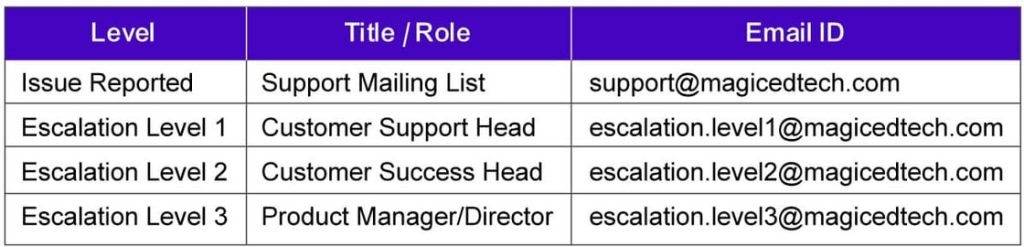
The MagicBox team has established a structure to manage escalations at different levels. In the absence of any response after the first escalation (i.e., Customer Support Portal), the customer can further escalate this ticket to a manager after a specific period of time. Similarly, a third-level escalation can be set up if the ticket is still not resolved successfully.
The entire escalation matrix is clearly defined, and at every step of the way, the right people are assigned ownership of the problem.
Student New UI/UX Limited Rollout – BTS 2025
For customers who have opted into the New UI/UX Portal for Back to School 2025, now is a great time to update your marketing websites and user documentation to reflect the latest improvements.
New UI/UX – Student Portal – View the Updated Student Portal
The student experience has been significantly upgraded to enhance navigation, accessibility, and overall engagement:
- A cleaner, more organised Library layout
- A more interactive Assessment Player
- An upgraded Grades tab with detailed feedback and progress insights
- Improved ePub reader experience
- Support for custom themes and personalised branding
If you need support updating your resources or want a walkthrough of the new experience, our team is here to help!
