MagicBox KEA

AI-powered Learning Assistant for Personalized Learning

Schedule a Demo

Empowering Personalized Learning with AI

KEA is an AI-powered study partner that empowers students to learn deeply and in a manner that suits their learning style. It delivers customized summaries and recommendations to keep learners on track. From
personalized feedback to answering tough questions and gaining deeper insights into course content, KEA has got it all covered!

KEA Learning Assistant: Your Digital Study Partner

kea

Ask KEA

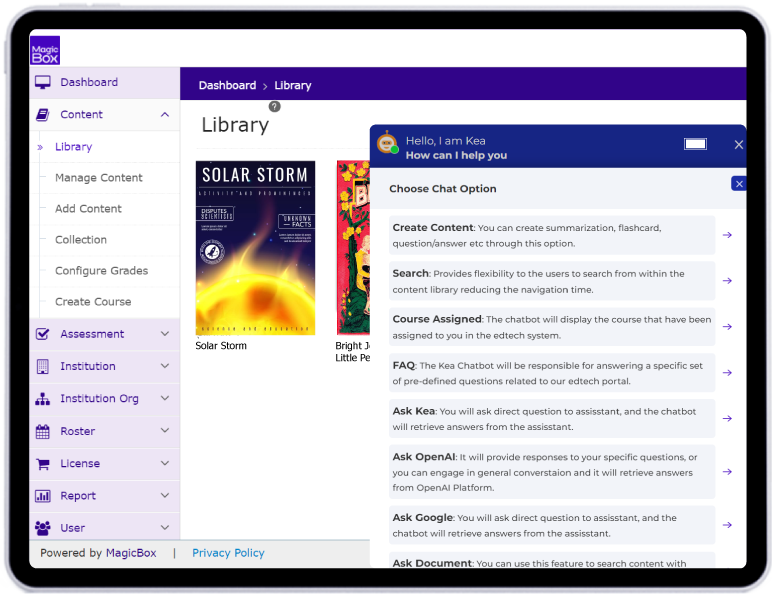
Meet the new digital learning study partner! The KEA Assistant leverages the combined intelligence of AI and MagicBox's Learning Assistant to deliver succinct, relevant responses. Simplify your study process with accurate, on-demand information.

FAQ Assistant

FAQ Assistant

FAQ Assistant provides quick and precise answers to common questions, helping users navigate their learning journey smoothly. Save time and find solutions instantly.

ebook support

Enhanced E-book Support with Chatbot

Revolutionize your study sessions with enhanced e-book support. Users can create detailed Q&A, assessments, flashcards, and summaries from any page of the e-book, making preparation comprehensive and effective.

Summarization

Our AI technology generates concise and coherent summaries from long-form content you add to the platform.

Ask Google

Ask Google

Tap into the world's largest repository of information. With Google AI Integration, users can obtain reliable, current data from Google's extensive knowledge base, ensuring that learning resources are always up-to-date.

Ask Open

Ask Open AI

Engage in dynamic conversations with Open AI like ChatGPT. Whether users prefer a chat format or direct Q&A, our integration offers flexible, interactive ways to get the answers they need, enhancing user learning experience.

search

Seamless Search

Discover information effortlessly with our seamless search functionality. Quickly locate answers within e-books and courses, with transparent source attribution.

Ask-Document

Ask Document

Ask Document leverages advanced AI capabilities to transform how users interact with documents. This powerful tool can answer questions, provide summaries, and generate content based on the document uploaded. It simplifies the process of extracting and utilizing information, making document management more efficient and effective.

Courses

Assigned Courses

Stay organized and on top of coursework. Users can easily access a list of assigned courses and submit completed tasks without any hassle. Keep track of academic progress with a few simple clicks.

AI-powered Learning Assistant for Personalized Learning

The MagicBox Advantage

Personalized Learning assistant

KEA tailors the learning experience to individual students by offering personalized feedback, summaries, and content suggestions, ensuring each learner progresses at their own pace.

Through dynamic interactions with AI, including Q&A, flashcards, and content generation, KEA keeps students engaged and motivated to learn more effectively.

With AI-powered summarization and instant access to accurate information, KEA helps learners save time while ensuring they grasp the key concepts quickly and efficiently.

KEA’s enhanced e-book support allows for the creation of custom assessments, flashcards, and summaries directly from course content, helping learners reinforce their knowledge.

Whether through Google’s knowledge base or OpenAI, KEA provides real-time, on-demand answers and insights, keeping students updated with the latest information.

KEA simplifies the study process by offering seamless search functionality, document analysis, and easy access to assigned coursework, ensuring students stay organized and on track.

Built on advanced AI, KEA scales effortlessly to support a wide range of learners and integrates smoothly into diverse digital learning environments, making it a versatile solution for educational platforms.

FAQs

KEA is an AI Learning Assistant built for education, using publisher or institution-owned content to provide guided answers, summaries, flashcards, and learning support. It helps learners understand content without relying on the open web.

Yes. KEA supports multilingual learning experiences, helping publishers and institutions provide AI-powered learning assistance across different languages and learner populations.

The right AI learning assistant should provide accurate, curriculum-aligned support based on trusted educational content. KEA uses publisher-owned content to deliver guided learning assistance rather than unrestricted web-based responses.

An effective AI learning assistant should provide reliable, curriculum-focused guidance while keeping learners engaged with their course content. KEA supports students with contextual Q&A, summaries, flashcards, and guided learning assistance.

KEA is designed specifically for education and works with publisher or institution-owned content. It provides guided hints and contextual learning support rather than unrestricted answers based on general web information.

AI learning assistants can use learner progress, course content, and assessment data to provide more relevant learning support. KEA helps learners engage with their assigned educational content through contextual Q&A, summaries, and study tools.

Yes. KEA can be integrated into existing digital learning environments and LMS ecosystems, allowing learners to access AI-powered assistance alongside their course content.

KEA’s FAQ Assistant helps learners quickly find answers and relevant information within their course content. It reduces time spent searching through eBooks and learning materials.

Yes. KEA can generate learning resources such as flashcards, quizzes, and summaries from publisher-owned eBook and course content, helping learners review material more efficiently.

Yes. Publishers and educational institutions can configure KEA around their own content libraries, enabling a branded AI learning experience grounded in their curriculum and learning materials.

Talk to our Experts

talk_our_expert_right_image