Exciting Updates: New and Upgraded AI-Powered KEA Assistant in MagicBox! - MagicBox
Skip to content
MagicBox- digital learning platform logo
magnifying-glass
  • Features arrow-down
    • AI Learning Assistant
    • Course Authoring
    • Digital Rights Management
    • eReader
    • Integrations & Standards
    • Learning Analytics
    • Online Assessments
  • Innovate with AI arrow-down
    • AI Learning Assistant KEA
    • AI-powered Course and Assessment Authoring
  • Services arrow-down
    • Content Migration & Ingestion
    • Learning Product Consulting
    • Premium Support
    • RFP Response Support
  • Markets Served arrow-down
    • Education Publishing
    • K12 Schools & Districts
    • Higher Education Institutions
    • Enterprise SAAS
  • Resources arrow-down
    • Awards
    • Blog
    • Case Studies
    • Educator Insights Podcast
    • How to Guide
    • Newsletters
    • Newsroom
    • Testimonials
    • Videos
    • Whitepapers
    • Webinar
  • Try AI for Free
  • Get in Touch
  • Features arrow-down
    • AI Learning Assistant
    • Course Authoring
    • Digital Rights Management
    • eReader
    • Integrations & Standards
    • Learning Analytics
    • Online Assessments
  • Innovate with AI arrow-down
    • AI Learning Assistant KEA
    • AI-powered Course and Assessment Authoring
  • Services arrow-down
    • Content Migration & Ingestion
    • Learning Product Consulting
    • Premium Support
    • RFP Response Support
  • Markets Served arrow-down
    • Education Publishing
    • K12 Schools & Districts
    • Higher Education Institutions
    • Enterprise SAAS
  • Resources arrow-down
    • Awards
    • Blog
    • Case Studies
    • Educator Insights Podcast
    • How to Guide
    • Newsletters
    • Newsroom
    • Testimonials
    • Videos
    • Whitepapers
    • Webinar
  • magnifying-glass
  • Try AI for Free
  • Get in Touch
banner-may-2024

We are excited to announce a major update to our AI Powered KEA Assistant on the Magicbox digital learning platform.

This update brings several significant enhancements designed to improve your experience and streamline your interactions with the KEA Assistant and the overall Magic Box platform. Here’s what’s new:
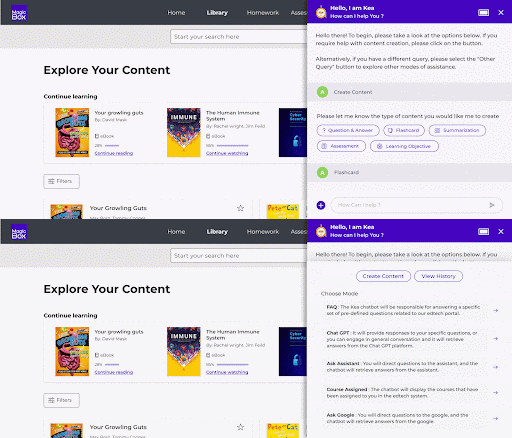
  • Seamless Integration: Our new design ensures a seamless integration, providing a more cohesive and intuitive experience within the Magic Box environment.
  • Enhanced Navigation: The new KEA Assistant offers streamlined navigation with clear, concise explanations of all available assistance modes, making it easier for you to find and utilize the features you need.
  • Generative AI Capabilities: One of the most exciting updates is the addition of Generative AI support. The new KEA Assistant empowers you to create content effortlessly. You can now select text directly from the screen or type custom text to generate new content, enhancing your productivity and creativity.
KEA New UI
image-1-may2024
KEA Assistant

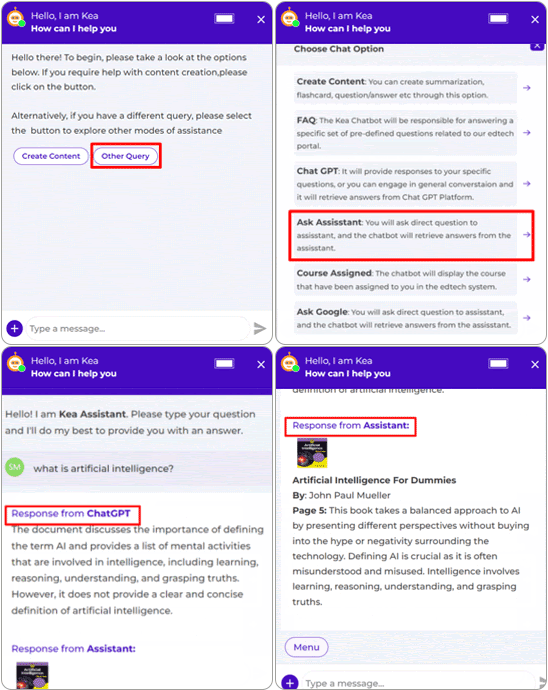
With the KEA Assistant users can get summarized responses from ChatGPT as well as the Learning Assistant.

image-2-may2024
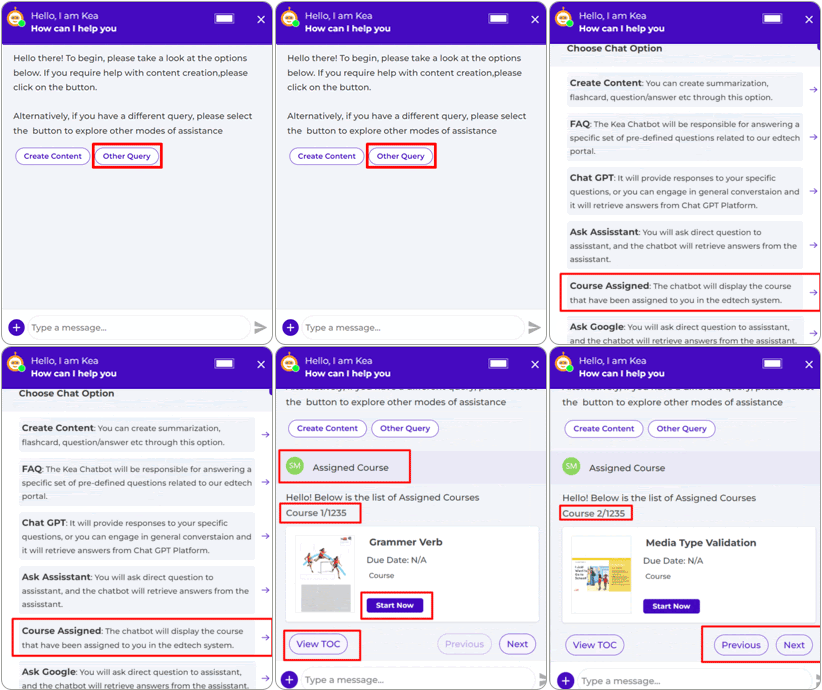
Assigned Courses

With the Assigned course functionality, users can view and submit their assigned courses.

image-3-may2024
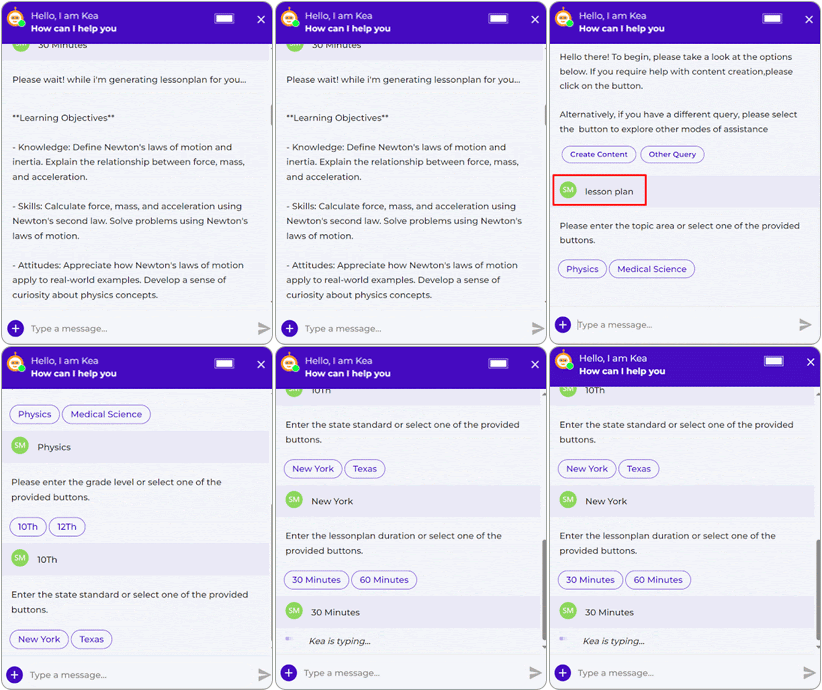
Lesson Plan Generator

Allow users to choose lesson plans based on specific questions. Users can opt for videos, e-books, and course materials as per their needs.

image-4-may2024
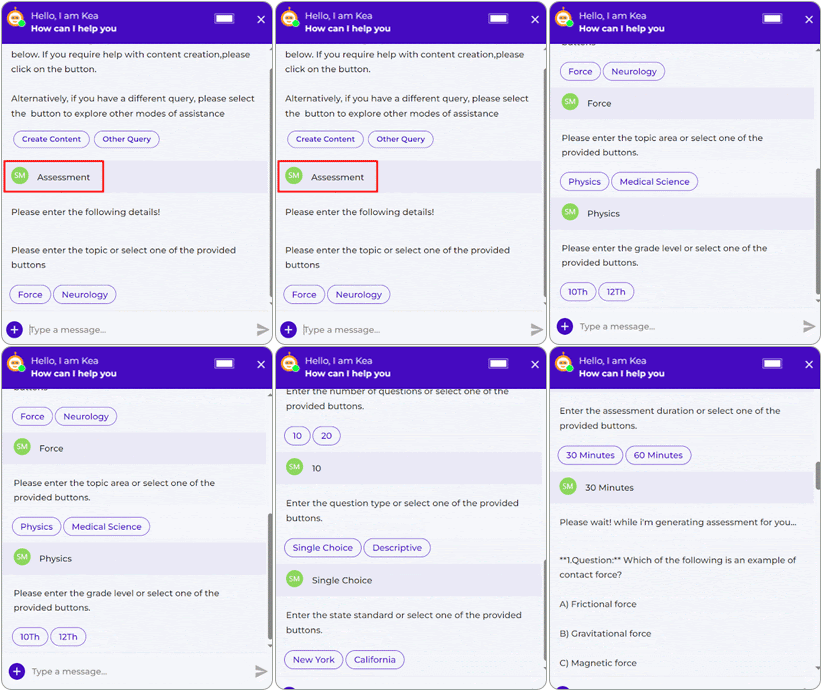
Assessment Generator

Users can customize their assessment experience by choosing between single or descriptive question types also as per their preferences of time duration of 30 or 60 minutes.

image-5-may2024
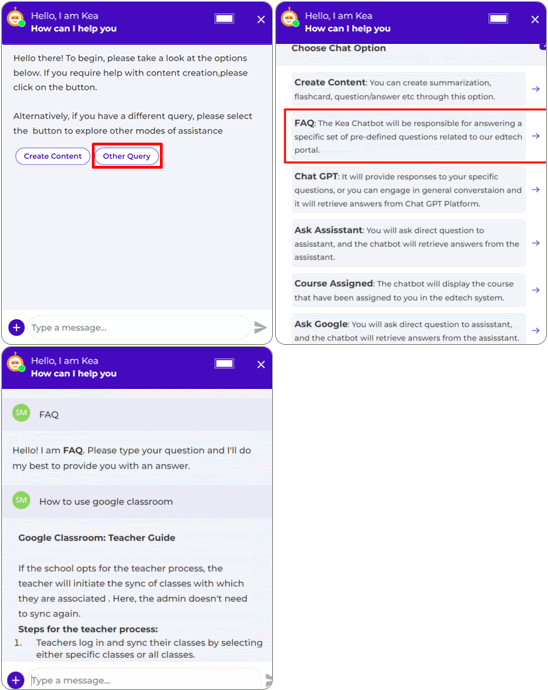
FAQ

KEA assistant can answer FAQs previously asked by the user. These FAQs and answers are manually added by the Magic Box team to KEA assistant, from the admin portal.

image-6-may2024
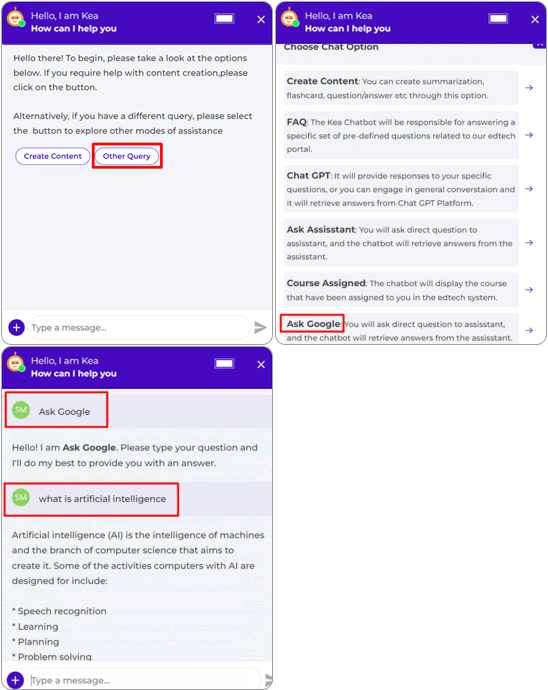
Google AI

Users can use this feature to get answers sourced directly from Google with accurate and up-to-date responses from one of the most extensive knowledge bases on the internet.

image-7-may2024
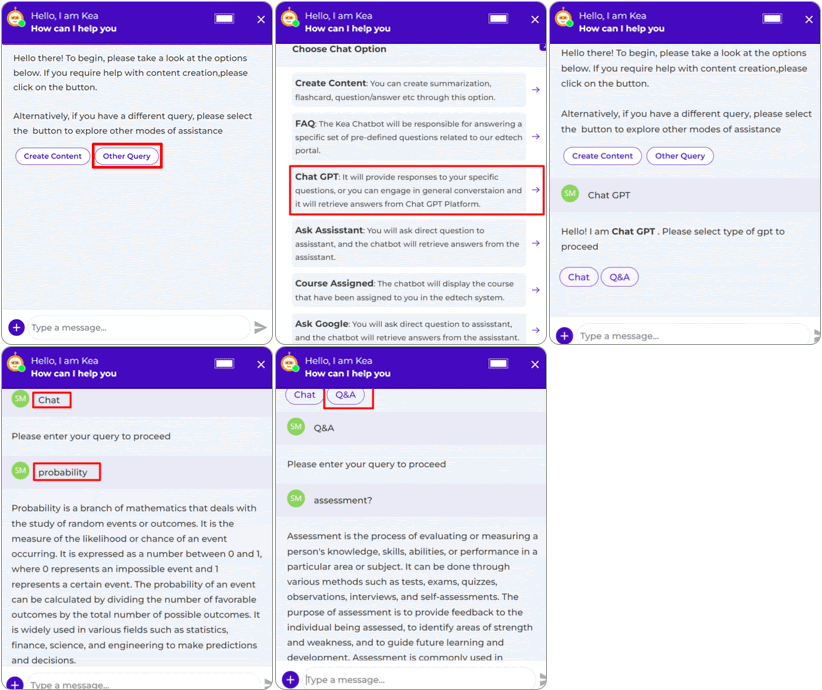
ChatGPT

In the ChatGPT functionality, the 2 sub-menu options for chat and Q&A are aligned. In the chat menu users can ask questions and for Q&A users can ask questions from Chat GPT.

image-8-may2024
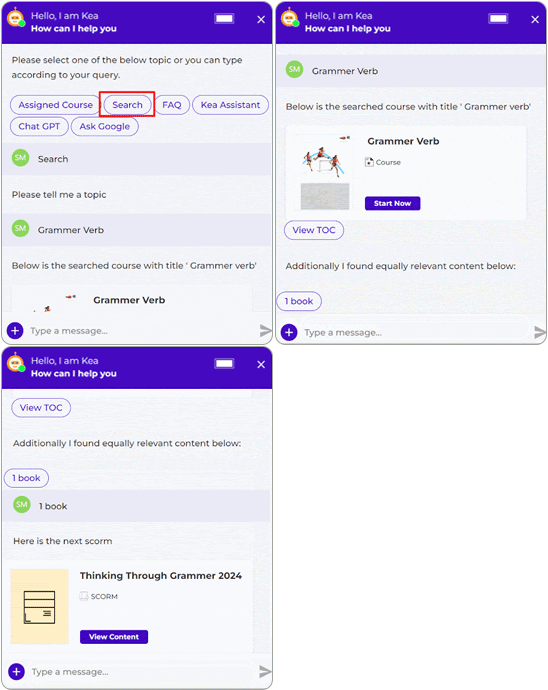
Search

The Learning Assistant can provide answers from within an e-book and course, along with the e-book/course from which it has picked the answer.

image-9-may2024
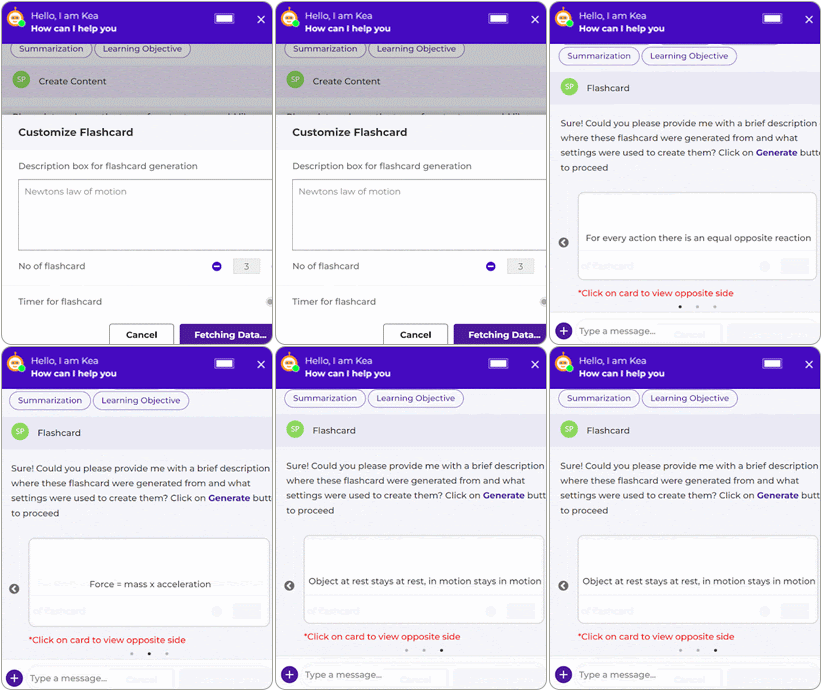
Flashcard

KEA Assistant now offers a flashcard generation. This allows users to create flashcards from the content they are working on.

image-10-may2024

Note: To deploy AI features at your side, several prerequisites such as content ingestion, model setup, configuring LLM partners must be addressed in coordination with the MagicBox Product Team. Also, these features are behind a paywall.

To discuss this further, please get in touch with your customer success manager.


To access our newsletter from last month, please click here.

bottom-1.jpg
MagicBox- digital learning platform logo

Products

  • MagicBox
  • MagicSync

Resources

  • Whitepapers
  • Case Studies
  • Videos
  • Press Release
  • Newsletter

Blog

  • Content Distribution Platform
  • Mobile Learning in Education
  • AI in Education
  • Digital Publishing
  • LMS integrations
  • Content Authoring
  • K-12 Education

Company

  • About us
  • Career
  • Magic Pathshala

Contact us

  • Live demo
  • Schedule a call

MagicBox Offerings

Best ereader App,  
PDF to ePub3 Conversion,  
Digital Content Distribution Platform,  
DRM Protected ebook Distribution,  
Personalized Learning Platform,  
Online Assessment Tools,  
Remote learning platform,  
State Textbook Adoption,  
MagicBox Student Portal,  
Digital-Age District Admin,  
Digital Teaching Experience,  
Empowering Learning with Ease and Engagement,  
AI in Personalized Learning,  
Video Assessment,  
Digital Accessibility,  
Education Publishing,  
eBook Publishing and Distribution,  
ADA Title II Accessibility Compliance,  

Explore AI Summary

2025 © MagicBoxTM All rights reserved.
Cookie Policy | Privacy Policy